Go to Dashboard → Expiry Report.
View all expiry documents.
Replace or delete documents as needed.
Export CSV if required.
You can receive a daily expiry report by email if Get Expiry Report = ON in your profile.
Drivers also receive daily expiry notifications for:
Their profile
Attached Vehicle
Attached Trailer
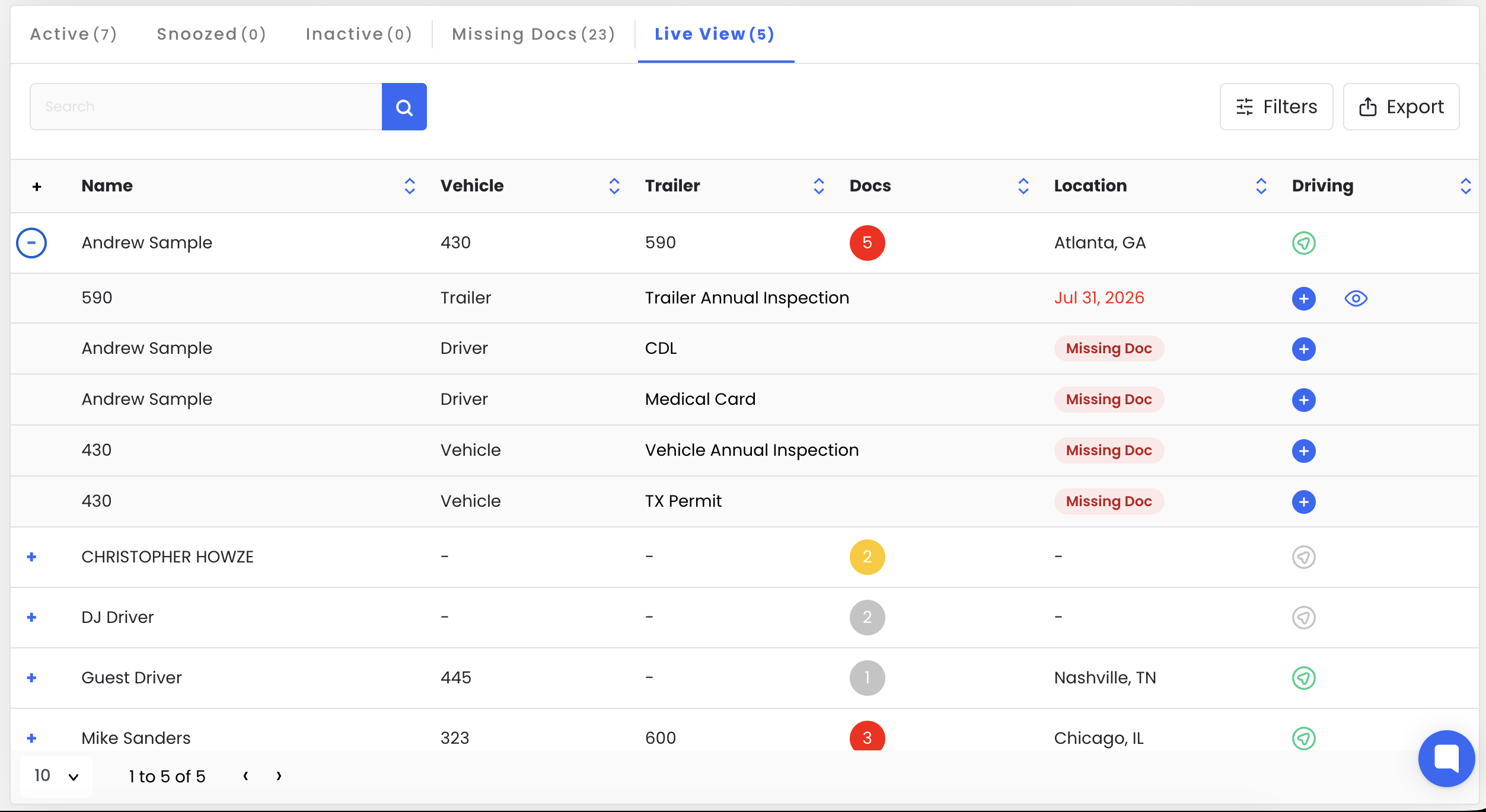
Live View will allow you to see expired, expiring, and also missing documents all in one view connected to the driver.
Live View will show all active drivers that have missing files+ Current Vehicle, and Current Trailer attached to the driver.
Gray Bubble with Docs # will show if only missing documents.
Yellow Bubble with Docs# will show if expiring soon documents, or missing.
Red Bubble with Docs # will show if you have EXPIRED documents, and also expiring soon or missing.
Keep in mind to set required documents/ missing. Go to Settings, Doc Types, and set required to YES for any type that you would wand to be required for all drivers, or equipment.
Location / Driving Would required ELD integration and might not work without contacting support